Find anything, fast.
Three layers of search: the quick filter to narrow the current view, Quick Search to scan a folder by name, and Full Search to hunt across a whole tree — names, contents, even inside archives. All keyboard-driven.
The quick filter
Press / in any pane to start typing a filter. Captain’s Deck hides every file whose name doesn’t match — instantly, as you type.
- Case-insensitive by default
- Substring match anywhere in the name
- Esc clears the filter
The filter is view-only. Selection, copy, and other operations only see filtered files — perfect for “copy all the .png files” without manually selecting.
Quick Search
Cmd+F opens Quick Search. As you type, it filters the current folder by name and jumps to the matches — fast, in-memory, with no walking of subfolders.
- Search subfolders — tick this to turn Quick Search into a recursive name search of the whole tree beneath the current folder.
- Case sensitive — off by default; tick to match capitalisation exactly.
Need to search file contents, or look inside archives? Reach for Full Search (Shift+Cmd+F) instead.
Full Search
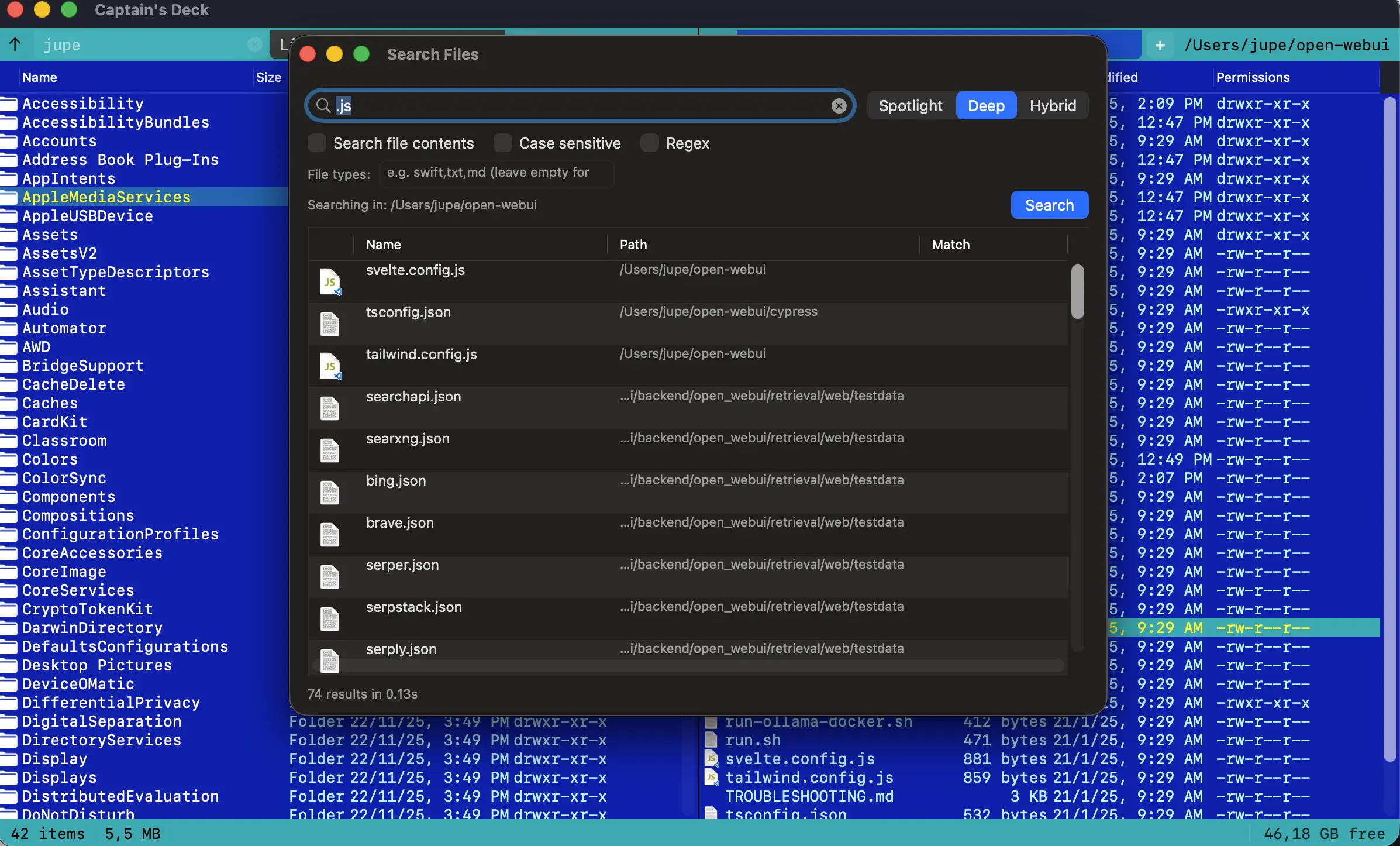
Shift+Cmd+F opens Full Search — the powerful, recursive one, rooted at the active pane’s directory. Results appear in a panel that slides up from the bottom and stream in as the walk progresses.
Navigate results with j/k, press Enter to jump to a hit in the pane, or press Cmd+Enter to send every result to the inactive pane as a virtual folder — perfect for batch operations on the matches.
Choose how it looks with the mode selector:
- Spotlight — leans on the macOS index for near-instant results.
- Deep — the default. Walks the tree directly, so it finds everything, indexed or not.
- Hybrid — starts from the index, then fills the gaps with a direct walk.
The remaining controls narrow what counts as a match:
- Search file contents — look inside files, not just at their names.
- Case sensitive and Regex — match capitalisation exactly, or treat the query as a full regular expression.
- Search in archives and Search archive contents — reach into ZIPs and other archives, by name and by content.
- File types — a comma-separated list of extensions (for example
swift,txt,md) to limit the hunt to just those kinds. This is the one and only attribute filter — there are no size, date, owner, or kind predicates. - Save… — keep a search for later; it lands in the sidebar under Saved Searches.
On the direct-download build, Full Search hands the heavy lifting to fd and ripgrep when they’re installed, for a big speed-up. The sandboxed Mac App Store build can’t run external binaries, so it uses the built-in walker instead — same results, a little slower on very large trees.
Patterns & content
Full Search understands three flavours of name matching. Two checkboxes have keyboard shortcuts so you don’t need to mouse over:
- Cmd+E — toggle Regex. Off = substring or glob; on = full regex.
- Cmd+/ — toggle Case sensitive.
| Plain | Substring match |
| Glob | *.swift, **/test_*.py |
| Regex | Full PCRE2 — ^\d{4}-.*\.md$ |
Tick Search file contents to grep inside files as well. Captain’s Deck respects .gitignore, .cdignore, and binary-file detection:
- Per-line previews with the matching span highlighted
- Enter on a result opens the file scrolled to the match
- Cmd+D opens the diff view against the inactive pane’s same-named file
Saved searches
Run a search you’ll want again? Click Save… in Full Search, give it a name, done. The saved search appears in the sidebar under a Saved Searches section.
Click a saved search to re-run it against the active pane’s current path — Full Search reopens pre-filled with the same query, mode, regex/case toggles, and file-type filter you saved. Right-click → Remove Saved Search to delete one.
Saved searches live in your preferences, not per-folder, so they follow you no matter where you’re working.

Quick Open
Cmd+P opens a fuzzy command palette that searches across files, folders, bookmarks, and named commands. It’s the fastest way to jump anywhere when you don’t want to navigate.